
アニメーションカーソル(ANI)の読込と作成(Delphi)
Windowsで使用されるアニメーションカーソル(拡張子:ANI)を読込・作成するサンプルです。32x32ドットの2-256色(1bit/4bit/8bit)、ホットスポット、タイトル及び作者名、表示速度(Jiffy単位)、フレームとイメージに対応しています。コンパイルが出来ない方の為に実行ファイルも付属していますのでアニメーションカーソルのソフトウェアとしてもご使用頂けます。
サンプルの画面
ANIファイルの読込画面、作成画面の2画面あります。
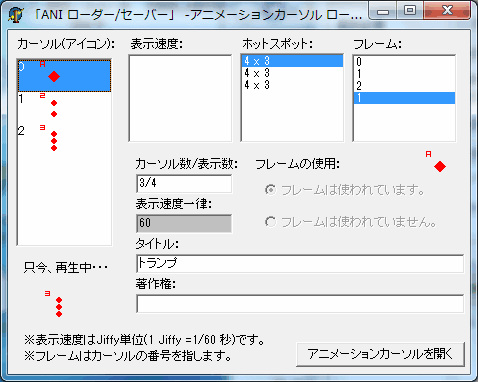
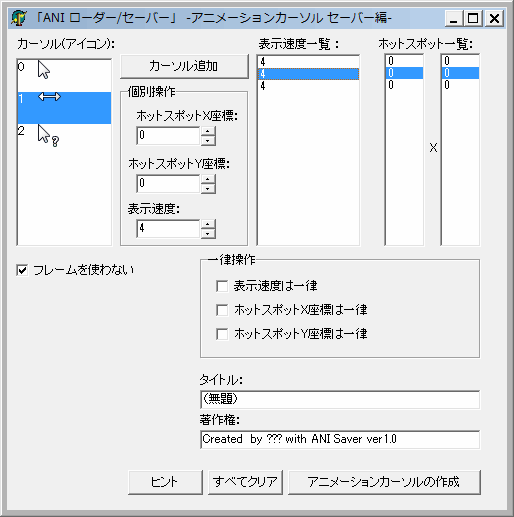
アニメーションカーソルの動作確認
Windows7でアニメーションカーソルの動作確認をする際には、ファイルを右クリックのプロパティで表示される画面の左上にあるアイコンがアニメーションで動作するようですのでそちらで動作確認をして下さい。
読み込み画面
ANIファイルの読み込み画面のソースコードです。
//==============================================================================
//
//        「ANI ローダー/セーバー」 -アニメーションカーソル ローダー編-
//
//                                                                   Version 1.1
//==============================================================================
//
// Version 1.0      初版完成  2001-04-04
// Version 1.1                2001-08-27
//
//==============================================================================
{
<最初に>

 このサンプルを理解する為には
   ・アイコンのフォーマット
   ・カーソルのフォーマット
   ・アニメーションカーソルのフォーマット
 に対する知識がないと何をやっているか全く解からないと思います。
 このサンプルを完全に理解したい場合はそれらのフォーマット仕様書を書籍などで仕入れてください。

  ・・・
  ※完全なアニメーションカーソルのフォーマットはほとんど出回っていません。
   なので、フォーマット自体はほとんど自己解析してサンプルを使っているので間違いなどがあるかも知れませんのでご了承下さい。m(--)m


<注意事項>

 コメント情報について

    文字数がどう考えても多すぎるとエラー(ANIが再生されない)になりますので注意して下さい。
   ※詳しい仕様書がない為、文字数の規定がわかりませんのでご了承下さい。

 再生について

   アニメーションカーソルはカーソルリストの一番最初の色数で再生されます。
   例)一番最初のカーソルの色数が2色でその次に続く色数が256色の場合は勝手に2色に減色されて再生されます。(実際(カーソルファイル自体)は減色されない)

  表示速度について

    アニメーションカーソルの表示速度はJiffy単位(1 Jiffy =1/60 秒)です。1=1秒ではないので間違えないようして下さい。

  イメージとフレームの違い

     まず、A→B→Cと表示されるアニメーションカーソルを考えて下さい。
    そのまま表示するだけならフレームは必要なくその3枚のイメージを追加するだけで完成します。

   次に、A→B→C→A→Bと表示させるにはどうしたらよいのでしょうか?
      フレームを使わないならABCABの5枚のイメージを追加するだけで完成します。
   しかし、この場合AとBのイメージはそれぞれ2枚同一に存在することになりファイルサイズの無駄です。
   ここでフレームを使います。5枚のフレームを追加して各フレームに関連づけるイメージをABCABとします。
   フレームが存在する場合はイメージの順番は無視されてフレームの順番に表示されるようになりますので
   この場合はイメージはABCの3枚で済むことになります。

   お分かり頂けたでしょうか?
     分からなかったとしてもアニメーションカーソルを読書きしているうちに次第にわかっていきます。


}

unit Demo_1;

interface

uses
  Windows, Messages, SysUtils, Classes, Graphics, Controls, Forms, Dialogs,
  StdCtrls, ExtCtrls, ComCtrls;

type
  TForm1 = class(TForm)
    Button1: TButton;
    Edit1: TEdit;
    Edit2: TEdit;
    Edit3: TEdit;
    Label1: TLabel;
    Label2: TLabel;
    Label3: TLabel;
    ListBox1: TListBox;
    ImageList1: TImageList;
    ListBox2: TListBox;
    Label6: TLabel;
    Edit4: TEdit;
    ListBox3: TListBox;
    Label4: TLabel;
    Label5: TLabel;
    Label7: TLabel;
    Label8: TLabel;
    Label9: TLabel;
    RadioButton1: TRadioButton;
    RadioButton2: TRadioButton;
    Label10: TLabel;
    Image1: TImage;
    OpenDialog1: TOpenDialog;
    Label11: TLabel;
    Label12: TLabel;
    ListBox4: TListBox;
    procedure Button1Click(Sender: TObject);
    procedure FormCreate(Sender: TObject);
    procedure ListBox1Click(Sender: TObject);
    procedure ListBox2Click(Sender: TObject);
    procedure ListBox3Click(Sender: TObject);
    procedure FormClose(Sender: TObject; var Action: TCloseAction);
    procedure ListBox4Click(Sender: TObject);
    procedure ListBox4DrawItem(Control: TWinControl; Index: Integer;
      Rect: TRect; State: TOwnerDrawState);
  private
    { Private 宣言 }
    procedure GetTitle(Stream:TMemoryStream;Position :integer);
    procedure GetCopyright(Stream:TMemoryStream;Position :integer);
    procedure GetANIHeader(Stream :TMemoryStream;Position:integer);
    procedure GetrateChunck(Stream:TMemoryStream);
    procedure GetCursorData(STream:TMemoryStream);
    procedure GetFrame(STream:TMemoryStream);
    procedure AllClear;
  public
    { Public 宣言 }
  end;

//アニメーションカーソルヘッダー
Type {36byte}
 TANIHEADER=packed record
   cbSizeOf : Dword; //この構造体のサイズ  ...常に36byte
   Frames   : Dword; //フレーム数          ...そのまま数を書き込む
   cSteps   : Dword; //サイクル数      ...フレーム数と同じで良い?
   cx       : Dword; //予約?               ...常に0
   cy       : Dword; //予約?               ...常に0
   cBitCount: Dword; //予約?               ...常に0
   cPlanes  : Dword; //予約?               ...常に0
   JifRate  : Dword; //表示時間
   flags    : Dword; //アニメーションフラグ...常に1
end;

//カーソルファイルヘッダー
type
 TCURFILEHEADER=packed record
  Reserved      : Word;//常に0
  ResourceType  : Word;//常に2 ※アイコンの場合は1
  ResourceCount : Word;//常に1
end;

//カーソルインフォヘッダー
type
 TCURINFOHEADER=packed record
  Width       : Byte ;//横幅
  Height      : Byte ;//縦幅
  ColorCount  : Byte ;//カラーカウント 0の場合がある
  X           : Word ;//Xホットスポット
  Y           : Word ;//Yホットスポット
  Reserved    : byte ;//常に0
  DIBSize     : Dword;//
  DIBOffset   : Dword;//常に22バイト
end;

var
 hStatic : integer;
 hAni    : integer;

var
  Form1: TForm1;

implementation

{$R *.DFM}

////////////////////////////////////////////////////////////////////////////////

//////// インテルオーダー word編
function IntelOder_word(Buffer :word):word;
begin
 Result :=(Buffer AND $00FF) shl 8 ;
 Result :=Result+(Buffer AND $FF00) shr 8  ;
end;

//////// タイトル情報を取得
procedure TForm1.GetTitle(Stream:TMemoryStream;Position :integer);
Var
 _INFO        : Dword   ; //タイトル情報
 _INAM        : Dword   ; //続 タイトル情報
 BUffer       : Dword   ;
 _Size        : Dword   ; //タイトルのサイズ
 i            : integer ;
 BufChar      : char    ;
 BufString    : String  ;
begin
   Edit1.text :='';
   BufString  :='';
   _INFO :=$4F464E49; //'INFO'チャンク
   _INAM :=$4D414E49; //'INAM'チャンク
   Stream.Read(Buffer,4);
   if CompareMem(@Buffer,@_INFO,4) then
   begin
     Stream.Read(Buffer,4);
     if CompareMem(@Buffer,@_INAM,4) then
     begin
        Stream.Read(_Size,4);
        //Delphi3の場合は動的配列が使えないので仕方なくFor文でまわす。
        for i:=1 to _Size do
        begin
            Stream.Read(BufChar, 1);
            BufString  :=BufString +(BufChar);
        end;
        Edit1.text :=BufString;
     end;
  end;
end;

//////// 著作権情報を取得
procedure TForm1.GetCopyright(Stream:TMemoryStream;Position :integer);
Var
 _IART        : Dword   ; //著作権情報
 BUffer       : Dword   ;
 _Size        : Dword   ; //タイトルのサイズ
 i            : integer ;
 BufChar      : char    ;
 BufString    : String;
begin
   Edit2.text :='';
   BufString  :='';
   _IART :=$54524149; //'IART'チャンク

   Stream.Position:=  Position;
   Stream.Read(Buffer,4);

   if CompareMem(@Buffer,@_IART,4) then
   begin
        Stream.Read(_Size,4);
        //Delphi3の場合は動的配列が使えないので仕方なくFor文でまわす。
        for i:=1 to _Size do
        begin
            Stream.Read(BufChar, 1);
            BufString :=BufString+(BufChar);
        end;
        Edit2.Text :=BufString;
  end;
end;

/////////  フレームを取得
procedure TFOrm1.GetFrame(STream:TMemoryStream);
Var
 i :integer;
 BUffer :integer;
 Count :integer;
begin
   Stream.Read(Buffer,4);
   Count:=Round(Buffer/4)-1;
   for i :=0 to COunt do
   begin
    Stream.Read(Buffer,4);
    ListBox3.Items.add(inttostr(buffer));
   end;
end;

///////// ANIHeaderの取得
procedure TForm1.GetANIHeader(Stream :TMemoryStream;Position:integer);
Var
 _anih        : Dword        ;//'anihチャンク'
 ANIHEADER    : TANIHEADER   ;//アニメーションヘッダー
 BUffer       : Dword;
begin
   //初期化
   Fillchar(ANIHEADER,sizeof(TANIHEADER),0);
   _anih :=$68696E61;
   Stream.Position:=Position;
   Stream.Read(Buffer,4);
   if CompareMem(@Buffer,@_anih,4) then
   begin
     Stream.position:= Stream.position+4;
     Stream.Read(ANIHEADER, sizeof(TANIHEADER));
     Edit3.Text :=inttostr(ANIHEADER.Frames);
     Edit4.Text :=inttostr(ANIHEADER.JifRate);
   end;
end;

///////// 表示する時間を列挙する(rateチャンク)
procedure TForm1.GetrateChunck(Stream:TMemoryStream);
Var
 Buffer  : integer;
 Count   : integer;
 i       : integer;
begin
   Stream.Read(Buffer,4);
   Count := Round(Buffer /4)-1 ;
   ListBox1.Items.Clear;
   for i := 0 to Count  do
   begin
     Stream.Read(Buffer,4);
     LIstBox1.Items.Add(inttostr(Buffer));
   end;
end;

/////////   カーソルデータの取得
procedure TForm1.GetCursorData(STream:TMemoryStream);
Var
 _icon     : Dword  ;
 _Size     : integer;
 _Pos      : integer;
 CUR       : TICON;
 Count,i   : integer;
 Buffer    : Dword;
 BufStream : TMemorySTream;
 CURFILEHEADER : TCURFILEHEADER ; //カーソルファイルヘッダー
 CURINFOHEADER : TCURINFOHEADER ; //カーソルインフォヘッダー
begin

   _icon :=$6E6F6369; //'icon'チャンク
   Fillchar(CURFILEHEADER,sizeof(TCURFILEHEADER),0);
   Fillchar(CURINFOHEADER,sizeof(TCURINFOHEADER),0);
   CUR :=TICON.Create;
   BufStream :=TMemoryStream.Create;

   //フレーム数を取得
   Count  :=Strtoint(Edit3.text) -1;

   //カーソルの列挙
   for i :=0 to count  do
   begin
      Stream.Read(Buffer,4);
      if CompareMem(@Buffer,@_icon,4) then
      begin
        //カーソルデータのサイズを取得
        Stream.Read(_Size,4);
        _Pos:=Stream.Position;

        Stream.Read(CURFILEHEADER,sizeof(TCURFILEHEADER));
        Stream.Read(CURINFOHEADER,sizeof(TCURINFOHEADER));
        ListBOx2.Items.Add(inttostr(IntelOder_word(CURINFOHEADER.x))+' x '+inttostr(IntelOder_word(CURINFOHEADER.y)));

        //カーソルをリストビューに格納
        CURFILEHEADER.ResourceType:=1;
        BufStream.Size :=0;
        BufStream.write(CURFILEHEADER,sizeof(TCURFILEHEADER));
        BufStream.write(CURINFOHEADER,sizeof(TCURINFOHEADER));
        BUfStream.CopyFrom(Stream,_Size-BUfStream.size);
        BUfStream.position:=0;
        CUR.LoadFromStream(BufStream);
        ImageList1.AddIcon(CUR);
        ListBox4.Items.Add(inttostr(ListBox4.Items.Count));

        //ストリームの場所を元に位置に戻す。
        Stream.position :=_Pos+_Size;

      end;
   end;
  CUR.Free;
  BufStream.Free;
end;

///////// 全て初期化
procedure TForm1.AllClear;
begin
    Edit1.Text :='';
    Edit2.TExt :='';
    Edit3.TExt :='';
    Edit4.TExt :='';
    ListBox4.Items.clear;
    Listbox1.Items.Clear;
    Listbox2.Items.Clear;
    Listbox3.Items.Clear;
    RadioButton2.Checked :=True;
    Image1.picture:=nil;
    ImageList1.Clear;
    Label11.caption:='只今、準備中・・・';
    Edit4.color:=clSilver;
    //解放
    DestroyCursor(hAni);
    DestroyWindow(hStatic)
end;

///////// エラー
procedure Error_Msg(Stream :TMemoryStream);
begin
 MessageBox(Application.Handle,'このファイルは読み込めません。','エラー',MB_ICONEXCLAMATION	);
 Stream.Free;
 FOrm1.AllClear;
end;

/////////
procedure TForm1.FormCreate(Sender: TObject);
begin
 AllClear;
 hStatic :=0;
 hAni    :=0;
end;

/////////
procedure TForm1.FormClose(Sender: TObject; var Action: TCloseAction);
begin
 AllClear;
end;

/////////
procedure TForm1.Button1Click(Sender: TObject);
Var
 MemoryStream : TMemoryStream;
 _RIFF        : Dword        ;  //'RIFF'チャンク
 _ACON        : Dword        ;  //'ACON'チャンク
 _LIST        : Dword        ;  //様々なチャンクをまとめているチャンク
 _rate        : Dword        ;  //イメージの秒数を続けて格納するチャンク
 _fram        : Dword        ;  //
 _seq         : Dword        ;  //フレームを使用

 _Pos         : integer      ;  //
 Buffer       : Dword        ;  //
 Position     : integer      ;  //
// i            : integer      ;  //
begin

 if OpenDialog1.Execute then
 begin
  try
   //初期処理
   _RIFF :=$46464952; //'RIFF'チャンク
   _ACON :=$4E4F4341; //'ACON'チャンク
   _LIST :=$5453494C; //'LIST'チャンク
   _rate :=$65746172; //'rate'チャンク
   _fram :=$6D617266; //'fram'チャンク
   _seq  :=$20716573; //'seq 'チャンク

    ALLClear;

    //ファイルの読み込み
    MemoryStream :=TMemoryStream.Create;
    MemoryStream.LoadFromFile(OpenDialog1.Filename);


//RIFF--------------------------------------------------------------------------
        //動的メモリを使用したほうが高速です

       //'RIFF'チャンクがあるか確認
       MemoryStream.Read(Buffer,4);
       if not CompareMem(@Buffer,@_RIFF,4) then
       begin
         Error_Msg(MemoryStream) ;
         Exit;
       end;

       //'ACON'チャンクがあるか確認
       MemoryStream.Position := 8;
       MemoryStream.Read(Buffer,4);
       if not CompareMem(@Buffer,@_ACON,4) then
       begin
         Error_Msg(MemoryStream) ;
         Exit;
       end;

//LIST--------------------------------------------------------------------------

       //'LIST'チャンクがあるか確認
       MemoryStream.Read(Buffer,4);
       if CompareMem(@Buffer,@_LIST,4) then
       begin
          MemoryStream.Read(_Pos,4);
          Position :=MemoryStream.Position;
          //著作権情報及びタイトルを取得
          GetTitle(Memorystream,MemoryStream.Position);
          GetCopyright(Memorystream,MemoryStream.Position);
          //'anih'チャンクの取得
          GetANIHeader(Memorystream,Position+_Pos);
       end
       else
          //'anih'チャンクの取得
          GetANIHeader(Memorystream,MemoryStream.Position-4);

//LIST--------------------------------------------------------------------------

          //'LIST'か'rate'か'seq'のチャンクがあるか確認
          MemoryStream.Read(Buffer,4);

          //'LIST'チャンクの場合
          if CompareMem(@Buffer,@_LIST,4) then
          begin

               //'fram'があるか確認
               MemoryStream.position :=  MemoryStream.position+4;
               MemoryStream.Read(Buffer,4);
               if CompareMem(@Buffer,@_fram,4) then
               begin
                   //カーソルデータの取得
                   GetCursorData(MemoryStream);

                   //標示時間の設定
                   if ListBox1.Items.count=0 then
                   begin
                     //for i := 0 to ListView1.items.count-1 do
                     //ListBox1.Items.Add(EDit4.Text);
                     Edit4.color:=clWhite;
                   end;
               end
               else
               begin
                 Error_Msg(MemoryStream) ;
                 Exit;
               end;

          end
          else
          begin
             //'rate'チャンクの場合
             if CompareMem(@Buffer,@_rate,4) then
             begin
                   //レートの取得
                   GetrateChunck(MemoryStream);
                   MemoryStream.Read(Buffer,4);
                   //'LIST'チャンクがある場合
                   if CompareMem(@Buffer,@_LIST,4) then
                   begin
                      //カーソルデータの取得
                      MemoryStream.position :=  MemoryStream.position+4;
                      MemoryStream.Read(Buffer,4);
                      if CompareMem(@Buffer,@_fram,4) then  GetCursorData(MemoryStream)
                      else
                      begin
                        Error_Msg(MemoryStream) ;
                        Exit;
                       end;
                   end
                   else
                   begin
                     //フレームがある場合
                     if CompareMem(@Buffer,@_seq,4) then
                     begin
                         //フレーム取得
                         GetFrame(Memorystream);
                         RadioButton1.Checked :=True;
                         //'LIST'チャンクがある場合
                         MemoryStream.Read(Buffer,4);
                         if CompareMem(@Buffer,@_LIST,4) then
                         begin
                             //カーソルデータの取得
                             MemoryStream.position :=  MemoryStream.position+4;
                             MemoryStream.Read(Buffer,4);
                             if CompareMem(@Buffer,@_fram,4) then  GetCursorData(MemoryStream)
                             else
                             begin
                                 Error_Msg(MemoryStream) ;
                                 Exit;
                             end;
                          end
                     end
                     else
                     begin
                          Error_Msg(MemoryStream) ;
                          Exit;
                     end;
                  end;
             end
             else
             begin
                  //'seq 'チャンクがある場合
                  if CompareMem(@Buffer,@_seq,4) then
                  begin
                         //フレーム取得
                         GetFrame(Memorystream);
                         RadioButton1.Checked :=True;
                         //'LIST'チャンクがある場合
                         MemoryStream.Read(Buffer,4);
                         if CompareMem(@Buffer,@_LIST,4) then
                         begin
                             //カーソルデータの取得
                             MemoryStream.position :=  MemoryStream.position+4;
                             MemoryStream.Read(Buffer,4);
                             if CompareMem(@Buffer,@_fram,4) then  GetCursorData(MemoryStream)
                             else
                             begin
                                 Error_Msg(MemoryStream) ;
                                 Exit;
                             end;
                          end
                     end
                     else
                     begin
                       Error_Msg(MemoryStream) ;
                       Exit;
                     end;
             end;
          end;

    MemoryStream.Free;

    //カーソル数/表示数の表示
    if ListBox3.Items.count<>0 then
       Edit3.Text:=  Edit3.Text +'/'+Inttostr(ListBox3.Items.count)
    else
      Edit3.Text:=   Edit3.Text +'/'+Edit3.Text;

    //アニメーションカーソルのハンドルを取得
    hAni := LoadImage(hInstance, Pchar(OpenDialog1.Filename),IMAGE_CURSOR,0,0, LR_LOADFROMFILE ) ;
    //アニメーションカーソルの再生用ウインドウを作成
    hStatic := CreateWindowEx(0,'Static', nil, WS_CHILD Or WS_VISIBLE Or SS_ICON,35,260,32,32,Form1.Handle,0 ,hInstance,nil);
    //再生
    SendMessage(hStatic, STM_SETIMAGE, IMAGE_CURSOR,hAni);
    Label11.caption:='只今、再生中・・・';
  except
    AllClear;
    MessageBox(Application.Handle,'予期せぬエラーが発生しました。','エラー',MB_ICONEXCLAMATION	);
  end;

 end;

end;


/////////
procedure TForm1.ListBox1Click(Sender: TObject);
begin
 if ListBox1.ItemIndex<>-1 then
 begin
   ImageList1.GetIcon(ListBox1.ItemIndex,Image1.picture.icon);
   if ListBox3.Items.count<>0 then ListBox3.itemindex:=ListBox1.Itemindex;
 end;
end;

/////////
procedure TForm1.ListBox2Click(Sender: TObject);
begin
  if ListBox2.ItemIndex<>-1 then ImageList1.GetIcon(ListBox2.ItemIndex,Image1.picture.icon);
end;

/////////
procedure TForm1.ListBox3Click(Sender: TObject);
begin
  if ListBox3.ItemIndex<>-1 then
  begin
   ImageList1.GetIcon(Strtoint(ListBox3.Items[ListBox3.ItemIndex]),Image1.picture.icon);
   if ListBox1.Items.count<>0 then ListBox1.itemindex:=ListBox3.Itemindex;
   ListBox2.Itemindex :=Strtoint(ListBox3.Items[ListBox3.itemindex]);
   ListBox4.Itemindex :=Strtoint(ListBox3.Items[ListBox3.itemindex]);
  end;
end;

/////////
procedure TForm1.ListBox4Click(Sender: TObject);
begin
 if ListBox4.ItemIndex<>-1 then
 begin
  ImageList1.GetIcon(ListBox4.ItemIndex,Image1.picture.icon);
  //このあたりはスレッドを使った方がいいかな?
  if ListBox1.Items.count<>0 then ListBox1.ItemIndex:=ListBox4.ItemIndex;
  ListBox2.ItemIndex:=ListBox4.ItemIndex;
 end;
end;

/////////
procedure TForm1.ListBox4DrawItem(Control: TWinControl; Index: Integer;
  Rect: TRect; State: TOwnerDrawState);
Var
 _ICON :TICON;
begin
  //オーナードロー
  ListBox4.Canvas.FillRect(Rect);
  _ICON:=TICON.Create;
  ImageList1.GetIcon(index,_ICON);
  ListBox4.Canvas.Draw(20,Rect.top,_ICON);
  ListBox4.canvas.TextOut(0,Rect.top,ListBox4.Items.Strings[index]);
  _ICON.free;
end;

end.
作成画面
ANIファイルの作成画面のソースコードです。
//==============================================================================
//
//        「ANI ローダー/セーバー」 -アニメーションカーソル セーバー編-
//
//==============================================================================
//                                                                   Version 1.1
//==============================================================================
//
// Version 1.0      初版完成  2001-04-04
// Version 1.1                2001-08-27
//
//==============================================================================

{

<最初に>

 このサンプルを理解する為には
   ・アイコンのフォーマット
   ・カーソルのフォーマット
   ・アニメーションカーソルのフォーマット
 に対する知識がないと何をやっているか全く解からないと思います。
 このサンプルを完全に理解したい場合はそれらのフォーマット仕様書を書籍などで仕入れてください。

  ・・・
  ※完全なアニメーションカーソルのフォーマットはほとんど出回っていません。
   なので、フォーマット自体はほとんど自己解析してサンプルを使っているので間違いなどがあるかも知れませんのでご了承下さい。m(--)m


<注意事項>

 コメント情報について

    文字数がどう考えても多すぎるとエラー(ANIが再生されない)になりますので注意して下さい。
   ※詳しい仕様書がない為、文字数の規定がわかりませんのでご了承下さい。

 再生について

   アニメーションカーソルはカーソルリストの一番最初の色数で再生されます。
   例)一番最初のカーソルの色数が2色でその次に続く色数が256色の場合は勝手に2色に減色されて再生されます。(実際(カーソルファイル自体)は減色されない)

  表示速度について

    アニメーションカーソルの表示速度はJiffy単位(1 Jiffy =1/60 秒)です。1=1秒ではないので間違えないようして下さい。

  イメージとフレームの違い

     まず、A→B→Cと表示されるアニメーションカーソルを考えて下さい。
    そのまま表示するだけならフレームは必要なくその3枚のイメージを追加するだけで完成します。

   次に、A→B→C→A→Bと表示させるにはどうしたらよいのでしょうか?
      フレームを使わないならABCABの5枚のイメージを追加するだけで完成します。
   しかし、この場合AとBのイメージはそれぞれ2枚同一に存在することになりファイルサイズの無駄です。
   ここでフレームを使います。5枚のフレームを追加して各フレームに関連づけるイメージをABCABとします。
   フレームが存在する場合はイメージの順番は無視されてフレームの順番に表示されるようになりますので
   この場合はイメージはABCの3枚で済むことになります。

   お分かり頂けたでしょうか?
     分からなかったとしてもアニメーションカーソルを読書きしているうちに次第にわかっていきます。


}
unit Demo_2;

interface

uses
  Windows, Messages, SysUtils, Classes, Graphics, Controls, Forms, Dialogs,
  StdCtrls, ComCtrls  ;

type
  TForm1 = class(TForm)
    Label8: TLabel;
    CheckBox2: TCheckBox;
    Label1: TLabel;
    Label2: TLabel;
    Edit2: TEdit;
    Edit3: TEdit;
    Label5: TLabel;
    Label9: TLabel;
    ListBox1: TListBox;
    ListBox2: TListBox;
    Button1: TButton;
    Button2: TButton;
    OpenDialog1: TOpenDialog;
    ListBox3: TListBox;
    Label7: TLabel;
    ImageList1: TImageList;
    GroupBox1: TGroupBox;
    CheckBox1: TCheckBox;
    Edit6: TEdit;
    UpDown4: TUpDown;
    CheckBox3: TCheckBox;
    Edit7: TEdit;
    UpDown5: TUpDown;
    CheckBox4: TCheckBox;
    Edit8: TEdit;
    UpDown6: TUpDown;
    GroupBox2: TGroupBox;
    Label3: TLabel;
    Label4: TLabel;
    Label6: TLabel;
    Edit1: TEdit;
    UpDown1: TUpDown;
    Edit4: TEdit;
    UpDown2: TUpDown;
    Edit5: TEdit;
    UpDown3: TUpDown;
    ListBox4: TListBox;
    Button3: TButton;
    SaveDialog1: TSaveDialog;
    ListBox99: TListBox;
    ListBox5: TListBox;
    Button4: TButton;
    ListBox6: TListBox;
    UpDown7: TUpDown;
    Edit9: TEdit;
    Label11: TLabel;
    Label12: TLabel;
    Label13: TLabel;
    Button5: TButton;
    procedure Button1Click(Sender: TObject);
    procedure CheckBox1Click(Sender: TObject);
    procedure Edit1Change(Sender: TObject);
    procedure Edit5Change(Sender: TObject);
    procedure Edit6Change(Sender: TObject);
    procedure Edit4Change(Sender: TObject);
    procedure CheckBox3Click(Sender: TObject);
    procedure CheckBox4Click(Sender: TObject);
    procedure Edit7Change(Sender: TObject);
    procedure Edit8Change(Sender: TObject);
    procedure UpDown1Changing(Sender: TObject; var AllowChange: Boolean);
    procedure UpDown4Changing(Sender: TObject; var AllowChange: Boolean);
    procedure ListBox4DrawItem(Control: TWinControl; Index: Integer;
      Rect: TRect; State: TOwnerDrawState);
    procedure ListBox4Click(Sender: TObject);
    procedure Button2Click(Sender: TObject);
    procedure Button3Click(Sender: TObject);
    procedure CheckBox2Click(Sender: TObject);
    procedure Button4Click(Sender: TObject);
    procedure ListBox5Click(Sender: TObject);
    procedure Edit9Change(Sender: TObject);
    procedure UpDown7Changing(Sender: TObject; var AllowChange: Boolean);
    procedure Button5Click(Sender: TObject);
  private
    { Private 宣言 }
  public
    { Public 宣言 }
  end;

//アニメーションカーソルヘッダー
Type {36byte}
 TANIHEADER=packed record
   cbSizeOf : Dword; //この構造体のサイズ  ...常に36byte
   Frames   : Dword; //フレーム数          ...そのまま数を書き込む
   cSteps   : Dword; //サイクル数      ...フレーム数と同じで良い?
   cx       : Dword; //予約?               ...常に0
   cy       : Dword; //予約?               ...常に0
   cBitCount: Dword; //予約?               ...常に0
   cPlanes  : Dword; //予約?               ...常に0
   JifRate  : Dword; //表示時間
   flags    : Dword; //アニメーションフラグ...常に1
end;

//カーソルファイルヘッダー
type {6byte}
 TCURFILEHEADER=packed record
  Reserved      : Word;//常に0
  ResourceType  : Word;//常に2 ※アイコンの場合は1
  ResourceCount : Word;//常に1
end;

//カーソルインフォヘッダー
type {16byte}
 TCURINFOHEADER=packed record
  Width       : Byte ;//横幅
  Height      : Byte ;//縦幅
  ColorCount  : Byte ;//カラーカウント 0の場合がある
  X           : Word ;//Xホットスポット
  Y           : Word ;//Yホットスポット
  Reserved    : byte ;//常に0
  DIBSize     : Dword;//
  DIBOffset   : Dword;//常に22バイト
end;

var
  Form1: TForm1;

implementation

{$R *.DFM}

////////////////////////////////////////////////////////////////////////////////

//////// インテルオーダー word編
function IntelOder_word(Buffer :word):word;
begin
 Result :=(Buffer AND $00FF) shl 8 ;
 Result :=Result+(Buffer AND $FF00) shr 8  ;
end;

/////////
procedure TForm1.Button1Click(Sender: TObject);
Var
 MemoryStream  : TMemoryStream;
 CURFILEHEADER : TCURFILEHEADER ; //カーソルファイルヘッダー
 CURINFOHEADER : TCURINFOHEADER ; //カーソルインフォヘッダー
 CUR           : TICON;
 X,Y           : integer;
begin
 //カーソル or アイコンの読込み
 if OpenDialog1.Execute then
 begin
      ListBox1.ItemIndex:=-1;
      ListBox2.ItemIndex:=-1;
      ListBox3.ItemIndex:=-1;
      ListBox4.ItemIndex:=-1;
      ListBox5.ItemIndex:=-1;
      ListBox6.ItemIndex:=-1;
      Fillchar(CURFILEHEADER,sizeof(TCURFILEHEADER),0);
      Fillchar(CURINFOHEADER,sizeof(TCURINFOHEADER),0);
      MemoryStream :=TMemoryStream.Create;
      CUR          :=TICON.Create;
      MemoryStream.LoadFromFile(OpenDialog1.FileName);
      MemoryStream.Read(CURFILEHEADER,sizeof(TCURFILEHEADER));
      MemoryStream.Read(CURINFOHEADER,sizeof(TCURINFOHEADER));
      X := IntelOder_word(CURINFOHEADER.X);
      Y := IntelOder_word(CURINFOHEADER.Y);
      //アイコンにする
      CURFILEHEADER.ResourceType  :=1;
      MemoryStream.Position:=0;
      MemoryStream.Write(CURFILEHEADER,Sizeof(TCURFILEHEADER));
      MemoryStream.Write(CURINFOHEADER,Sizeof(TCURINFOHEADER));
      //イメージリストにアイコン追加
      MemoryStream.Position:=0;
      CUR.LoadFromStream(MemoryStream);
      if (ImageList1.AddIcon(CUR)<>-1) AND (not CUR.Empty) then
      begin
        //ホットスポットの書き込み
        Updown1.POsition := X;
        Updown2.POsition  := Y;
        ListBox2.Items.Add(inttostr(Updown1.POsition));
        ListBox3.Items.Add(inttostr(Updown2.POsition ));
        //表示時間の書き込み
        if not CheckBox1.Checked then
         ListBox1.Items.Add(inttostr(Updown3.POsition ))
        else
         ListBox1.Items.Add(inttostr(Updown4.POsition )) ;
        //リストにアイテム追加
        ListBox4.Items.Add(inttostr(ListBox4.Items.count));
        if not CheckBox2.Checked then
        begin
          ListBox5.Items.Add(inttostr(ListBox5.Items.count));
          ListBox6.Items.Add(inttostr(ListBox4.Items.count-1));
        end;
        //リストに追加
        ListBox99.Items.Add(Opendialog1.Filename);
        //アップダウンの修正
        Updown7.Max:=ListBox4.Items.count-1;

      end
     else
      MessageBox(Application.Handle,'このファイルは読み込めません。','エラー',MB_ICONEXCLAMATION	);
      MemoryStream.FRee;
      CUR.Free;
 end;

end;

/////////
procedure TForm1.CheckBox1Click(Sender: TObject);
begin
  if not CheckBox1.Checked then
  begin
    Edit6.Visible :=false;
    UpDOwn4.Visible :=false;
    Edit5.Enabled :=true;
    UpDOwn3.Enabled :=true;
  end
  else
  begin
    Edit6.Visible :=true;
    UpDOwn4.Visible :=true;
    Edit5.Enabled :=false;
    UpDOwn3.Enabled :=false;
  end;
end;

/////////
procedure TForm1.CheckBox3Click(Sender: TObject);
begin
    if not CheckBox3.Checked then
  begin
    Edit7.Visible :=false;
    UpDOwn5.Visible :=false;
    Edit1.Enabled :=true;
    UpDOwn1.Enabled :=true;
  end
  else
  begin
    Edit7.Visible :=true;
    UpDOwn5.Visible :=true;
    Edit1.Enabled :=false;
    UpDOwn1.Enabled :=false;
  end;
end;

/////////
procedure TForm1.CheckBox4Click(Sender: TObject);
begin
  if not CheckBox4.Checked then
  begin
    Edit8.Visible :=false;
    UpDOwn6.Visible :=false;
    Edit4.Enabled :=true;
    UpDOwn2.Enabled :=true;
  end
  else
  begin
    Edit8.Visible :=true;
    UpDOwn6.Visible :=true;
    Edit4.Enabled :=false;
    UpDOwn2.Enabled :=false;
  end;
end;

/////////
procedure TForm1.CheckBox2Click(Sender: TObject);
Var
 i  :integer;
begin

 if MessageBox(Form1.handle,'表示速度、ホットスポット、フレーム、イメージ番号が初期化されますがよろしいですか?','確認',MB_OKCANCEL or MB_ICONQUESTION )=ID_OK then
 begin
     ListBox1.Items.clear;
     ListBox2.Items.clear;
     ListBox3.Items.clear;
     ListBox5.Items.clear;
     ListBox6.Items.clear;

     if CheckBox2.Checked then
     begin
       ListBox5.Visible:=false;
       ListBox6.Visible:=false;
       BUtton4.visible :=false;
       edit9.visible :=false;
       updown7.visible:=false;
       Label11.visible :=false;
       Label12.visible :=false;
       Label13.visible :=false;
       for i :=0 to ListBox4.Items.Count-1 do
       begin
        ListBox1.Items.add('4');
        ListBox2.Items.add('0');
        ListBox3.Items.add('0');
      end;
     end
     else
     begin
       ListBox5.Visible:=true;
       ListBox6.Visible:=true;
       BUtton4.visible :=true;
       edit9.visible :=true;
       updown7.visible:=true;
       Label11.visible :=true;
       Label12.visible :=true;
       Label13.visible :=true;
       for i :=0 to ListBox4.Items.Count-1 do
       begin
        ListBox1.Items.add('4');
        ListBox5.Items.add(inttostr(i));
        ListBox6.Items.add(inttostr(i));
        ListBox2.Items.add('0');
        ListBox3.Items.add('0');
      end;

     end;

  end;
end;

/////////
procedure TForm1.Edit1Change(Sender: TObject);
begin
 if CheckBox2.Checked then
 begin
  if ListBox4.ItemIndex<>-1 then ListBox2.Items[ListBox4.ItemIndex] :=EDit1.text
 end
 else
 begin
   if ListBox5.ItemIndex<>-1 then   ListBox2.Items[ListBox4.ItemIndex] :=edit1.text;
 end;
end;

/////////
procedure TForm1.Edit4change(Sender: TObject);
begin
  if CheckBox2.Checked then
  begin
    if ListBox4.ItemIndex<>-1 then ListBox3.Items[ListBox4.ItemIndex]:=EDit4.text
  end
  else
  begin
    if ListBox5.ItemIndex<>-1 then ListBox3.Items[ListBox4.ItemIndex] :=edit4.text;
  end;
end;

/////////
procedure TForm1.Edit5Change(Sender: TObject);
begin
 if CheckBox2.Checked then
 begin
   if ListBox4.ItemIndex<>-1 then  ListBox1.Items[ListBox4.ItemIndex]:=Edit5.text;
 end
 else
 begin
   if ListBox5.ItemIndex<>-1 then  ListBox1.Items[ListBox5.ItemIndex]:=Edit5.text;
 end;

end;

/////////
procedure TForm1.Edit6Change(Sender: TObject);
Var
 Count,i :integer;
begin
  if ListBox1.Items.Count<>0 then
  begin
   Count :=ListBox1.Items.Count-1;
   ListBox1.Items.Clear;
   For i :=0 to  Count do   ListBox1.Items.Add(inttostr(UpDown4.POsition));
  end;
end;

/////////
procedure TForm1.Edit7Change(Sender: TObject);
Var
 Count,i :integer;
begin
  if ListBox2.Items.Count<>0 then
  begin
   Count :=ListBox2.Items.Count-1;
   ListBox2.Items.Clear;
   For i :=0 to  Count do   ListBox2.Items.Add(inttostr(UpDown5.Position));
  end;
end;

/////////
procedure TForm1.Edit8Change(Sender: TObject);
Var
 Count,i :integer;
begin
  if ListBox3.Items.Count<>0 then
  begin
   Count :=ListBox3.Items.Count-1;
   ListBox3.Items.Clear;
   For i :=0 to  Count do   ListBox3.Items.Add(inttostr(UpDown6.POsition));
  end;
end;

/////////
procedure TForm1.UpDown1Changing(Sender: TObject;
  var AllowChange: Boolean);
begin
  if (ListBox4.Items.count=0) or (ListBox4.Itemindex=-1)  then   AllowChange:=false;
end;

/////////
procedure TForm1.UpDown4Changing(Sender: TObject;
  var AllowChange: Boolean);
begin
 if (ListBox4.Items.count=0)  then   AllowChange:=false;
end;

////////
procedure TForm1.ListBox4DrawItem(Control: TWinControl; Index: Integer;
  Rect: TRect; State: TOwnerDrawState);
Var
 _ICON :TICON;
begin
  //オーナードロー
  ListBox4.Canvas.FillRect(Rect);
  _ICON:=TICON.Create;
  ImageList1.GetIcon(index,_ICON);
  ListBox4.Canvas.Draw(20,Rect.top,_ICON);
  ListBox4.canvas.TextOut(0,Rect.top,ListBox4.Items.Strings[index]);
  _ICON.free;
end;

/////////
procedure TForm1.ListBox4Click(Sender: TObject);
begin
 if CheckBox2.Checked then
 begin
   if ListBox4.ItemIndex<>-1 then
   begin
    EDit1.text:= (ListBox2.Items[ListBox4.ItemIndex]) ;
    EDit4.text:= (ListBox3.Items[ListBox4.ItemIndex]) ;
    EDit5.text:= (ListBox1.Items[ListBox4.ItemIndex]) ;
    //このあたりはスレッドを使った方がいいかな?
    ListBox1.ItemIndex:=ListBox4.ItemIndex;
    ListBox2.ItemIndex:=ListBox4.ItemIndex;
    ListBox3.ItemIndex:=ListBox4.ItemIndex;
   end;
 end;
end;

/////////
procedure TForm1.Button2Click(Sender: TObject);
begin
 if MessageBox(Form1.handle,'設定を全てクリアしてよろしいですか?','確認',MB_OKCANCEL or MB_ICONQUESTION )=ID_OK then
 begin
    ListBox1.items.Clear;
    ListBox2.items.Clear;
    ListBox3.items.Clear;
    ListBox4.items.Clear;
    ListBox5.items.Clear;
    ListBox6.items.Clear;
    ImageList1.Clear;
    Edit1.Text:='0';
    Edit4.Text:='0';
    Edit5.TExt:='4';
    Edit6.TExt:='10';
    Edit7.TExt:='0';
    Edit8.TExt:='0';
    Edit9.TExt:='0';
    Checkbox1.Checked:=false;
    //Checkbox2.Checked:=true;
    Checkbox3.Checked:=false;
    Checkbox4.Checked:=false;
    ListBox99.Items.Clear;
    Edit3.Text:='Created by ??? with ANI Saver ver1.0';
    Edit2.Text:='(無題)';
 end;
end;

// アニメーションカーソルの作成-----------------------------------------------

/////////
procedure TForm1.Button3Click(Sender: TObject);
Var
 Stream       : TMemoryStream;
 StringStream : TStringStream;
 BufStream    : TMemoryStream;
 _RIFF        : Dword        ;  //'RIFF'チャンク
 _ACON        : Dword        ;  //'ACON'チャンク
 _LIST        : Dword        ;  //様々なチャンクをまとめているチャンク
 _rate        : Dword        ;  //イメージの秒数を続けて格納するチャンク
 _fram        : Dword        ;  //
 _seq         : Dword        ;  //フレームを使用
 _INFO        : Dword        ;  //タイトル情報
 _INAM        : Dword        ;  //続 タイトル情報
 _IART        : Dword        ;  //著作権情報
 _anih        : Dword        ;  //
 _icon        : Dword        ;  //

 _Pos         : integer;
 _Size        : integer;
 _Zero        : Dword        ;  //
 _Title       : string;
 BUffer       : Dword;
 ANIHEADER    : TANIHEADER   ;  //アニメーションヘッダー
 i            : integer;
 CURFILEHEADER : TCURFILEHEADER ; //カーソルファイルヘッダー
 CURINFOHEADER : TCURINFOHEADER ; //カーソルインフォヘッダー
begin

  if ListBox4.Items.count=0 then
  begin
    MessageBox(Application.Handle,'カーソルが未設定です。','エラー',MB_ICONEXCLAMATION);
    Exit;
  end;

  if (not CheckBox2.Checked) AND (ListBox5.Items.count=0)  then
  begin
    MessageBox(Application.Handle,'フレームが設定されいません。','エラー',MB_ICONEXCLAMATION);
    Exit;
  end;

 if SaveDialog1.Execute then
 begin
    if AnsicompareText('.ani',ExtractFileExt(SaveDialog1.filename))<>0 then SaveDialog1.Filename :=SaveDialog1.filename+'.ani';
    //初期処理
    _RIFF :=$46464952; //'RIFF'チャンク
    _ACON :=$4E4F4341; //'ACON'チャンク
    _LIST :=$5453494C; //'LIST'チャンク
    _rate :=$65746172; //'rate'チャンク
    _fram :=$6D617266; //'fram'チャンク
    _seq  :=$20716573; //'seq 'チャンク
    _INFO :=$4F464E49; //'INFO'チャンク
    _INAM :=$4D414E49; //'INAM'チャンク
    _IART :=$54524149; //'IART'チャンク
    _anih :=$68696E61; //'anih'チャンク
    _icon :=$6E6F6369; //'icon'チャンク
    _Zero :=0;
    Stream    :=TMemoryStream.Create;
    BufStream :=TmemoryStream.Create;
try
    Fillchar(ANIHEADER,sizeof(TANIHEADER),0);
    Fillchar(CURFILEHEADER,sizeof(TCURFILEHEADER),0);
    Fillchar(CURINFOHEADER,sizeof(TCURINFOHEADER),0);

    ANIHEADER.cbSizeOf :=sizeof(TANIHEADER);
    ANIHEADER.Frames   :=ListBox4.items.Count;
    if not CheckBox2.Checked then
      ANIHEADER.cSteps   :=ListBox5.items.Count
    else
     ANIHEADER.cSteps   :=ListBox4.items.Count;

    ANIHEADER.JifRate  :=Strtoint(ListBox1.Items[0]);
    ANIHEADER.flags    :=1;


//RIFF--------------------------------------------------------------------------
        //※GetMemの動的メモリを使用した方が高速です。

    //'RIFF'チャンクの書き込み
    Stream.Write(_RIFF,4);
    //ファイルサイズを書き込む(最後に書き込む)
    Stream.Write(_Zero,4);
    //'ACON'チャンクの書き込み
    Stream.Write(_ACON,4);

//LIST(文字列情報)--------------------------------------------------------------

    if  ((Edit2.Text<>'') or (Edit3.Text<>'')) then
    begin

      //'LIST'チャンクの書き込み
      Stream.Write(_LIST,4);
      //'LIST'チャンクのサイズを書き込む(後で書き込む)
      _Pos :=Stream.Position;
      Stream.Write(_Zero,4);

          //'INFO'チャンクの書き込み
          Stream.Write(_INFO,4) ;
            //'INAM'チャンクの書き込み(タイトル情報)
            if Edit2.Text<>'' then
            begin
                Stream.Write(_INAM,4);
                //'INAM'チャンクのサイズを書き込む
                _Size:= Length(Edit2.text)+2;
                Stream.Write(_Size,4);
                //文字列(タイトル情報)を書き込む
                _Title:=Edit2.text;
                StringStream :=TStringStream(Stream);
                StringStream.WriteString(_Title);
                STream :=TMemoryStream(StringStream);
                //何故かここに2バイト確保しないと動かない...理由はわかりません(^^;
                STream.Write(_Zero,2);
            end;
            //'IART'チャンクの書き込み(著作権情報)
            if Edit3.text<>'' then
            begin
                Stream.Write(_IART,4);
                //'IART'チャンクのサイズを書き込む
                _Size:= Length(Edit3.text)+1;
                Stream.Write(_Size,4);
                 //文字列(著作権情報)を書き込む
                _Title:=Edit3.text;
                StringStream :=TStringStream(Stream);
                StringStream.WriteString(_Title);
                STream :=TMemoryStream(StringStream);
                //何故かここに1バイト確保しないと動かない...理由はわかりません(^^;
                STream.Write(_zero,1);
             end  ;

          //'LIST'チャンクのサイズを書き込む
          _Size :=Stream.Position-_Pos-4;
          Stream.Position:=_Pos;
          Stream.Write(_Size,4);
     end;

//anih--------------------------------------------------------------------------

     Stream.Position:=Stream.Size;
     //'anih'チャンクの書き込み
     Stream.Write(_anih,4);
     //'anih'チャンクのサイズの書き込み
     _Size := sizeof(TANIHEADER);
     Stream.Write(_Size,4);

         //ANIHEADERの書き込み
         Stream.Write(ANIHEADER,Sizeof(TANIHEADER));

//rate--------------------------------------------------------------------------

    //表示時間が一律の場合でないとき
    if not CheckBox1.Checked  then
    begin
        //'rate'チャンクの書き込み
        Stream.Write(_rate,4);
        //'rate'チャンクのサイズを書き込む
        _size:=ListBox1.Items.count*4;
        Stream.Write(_size,4);

        for i :=0 to  ListBox1.Items.count-1 do
        begin
          BUffer :=Strtoint(ListBox1.Items[i]);
          Stream.Write(BUffer,4);
        end;
    end;

//seq --------------------------------------------------------------------------

    //フレームを使う時
    if not CheckBox2.Checked  then
    begin
        //'seq 'チャンクの書き込み
        Stream.Write(_seq,4);
        //'seq 'チャンクのサイズを書き込む
        _size:=ListBox5.Items.count*4;
        Stream.Write(_size,4);

        for i :=0 to  ListBox5.Items.count-1 do
        begin
          BUffer :=Strtoint(ListBox6.Items[i]);
          Stream.Write(BUffer,4);
        end;
    end;

//LIST(イメージデータ情報)------------------------------------------------------


     //'LIST'チャンクの書き込み
     Stream.Write(_LIST,4);
     //'LIST'チャンクのサイズを書き込む(後で書き込む)
     _Pos :=Stream.Position;
     Stream.Write(_Zero,4);

          //'fram'チャンクの書き込み
          Stream.Write(_fram,4) ;
          for i :=0 to Listbox4.Items.count-1 do
          begin
             //'icon'チャンクの書き込み
             Stream.Write(_icon,4) ;
             //'icon'チャンクのサイズの書き込み

                 //アイコンからカーソルへ変換&リストボックスのデータを書き込む

                 // ImageList1.GetIcon(i,xxx); <---DelphiのTICONは256色のアイコンをわざわざ16色に落とすのでこのような使い方はしないこと
                 // bufStream.CopyForm(xxx,0);

                 BufStream.size:=0;
                 //ファイルが消えている場合
                 if not FileExists (ListBox99.Items[i])then
                 begin
                     MessageBox(Application.Handle,pchar('以下のファイルが宇宙の彼方へ飛んでいます。(^^;'+#13#10+ListBox99.Items[i]+#13#10+'・・・よって強制終了します。'), 'エラー',MB_ICONEXCLAMATION	);
                     Stream.FRee;
                     BufStream.free;
                     halt;
                 end;
                 BufStream.LoadFromFIle(ListBox99.Items[i]);
                 BufStream.Position:=0;
                 BufStream.Read(CURFILEHEADER,sizeof(TCURFILEHEADER));
                 BufStream.Read(CURINFOHEADER,sizeof(TCURINFOHEADER));
                 //カーソルファイルヘッダー
                 CURFILEHEADER.Reserved      :=0;
                 CURFILEHEADER.ResourceType  :=2;
                 CURFILEHEADER.ResourceCount :=1;
                 //カーソルインフォヘッダー
                 CURINFOHEADER.X:=IntelOder_word(Strtoint(ListBox2.items[i]));
                 CURINFOHEADER.Y:=IntelOder_word(Strtoint(ListBox3.items[i]));
                 CURINFOHEADER.Width  :=32;
                 CURINFOHEADER.Height :=32;
                 CURINFOHEADER.Reserved:=0;
                 BufStream.position :=0;
                 BufStream.Write(CURFILEHEADER,Sizeof(TCURFILEHEADER));
                 BufStream.Write(CURINFOHEADER,Sizeof(TCURINFOHEADER));

             _size :=BufStream.size;
             Stream.Write(_size,4) ;
             Stream.copyfrom(BufStream,0);

          end;

     //'LIST'チャンクのサイズを書き込む
     _Size :=Stream.Position-_Pos-4;
     Stream.Position:=_Pos;
     Stream.Write(_Size,4);

     //ファイル全体のサイズを書き込む
     _Size :=Stream.size;
     Stream.Position:=4;
     Stream.Write(_Size,4);


     Stream.SaveToFile(SaveDialog1.Filename);

except
    Stream.FRee;
    BufStream.free;
    MessageBox(Application.Handle,'ファイル書込み中にエラーが発生しました。','エラー',MB_ICONEXCLAMATION);
    Halt;
end;
   Stream.FRee;
   BufStream.free;

end;

end;

/////////
procedure TForm1.Button4Click(Sender: TObject);
begin
  if ListBox4.Items.count=0 then
  begin
    MessageBox(Application.Handle,'カーソルが未設定です。','エラー',MB_ICONEXCLAMATION);
    Exit;
  end;
  Listbox5.items.Add(inttostr(ListBox5.items.count));
  Listbox6.items.Add('0');
  if ListBox1.Items.Count<>Listbox5.items.count then  ListBox1.Items.Add('4');
end;

/////////
procedure TForm1.ListBox5Click(Sender: TObject);
begin


 if ListBox5.ItemIndex<>-1 then
 begin
  ListBox6.ItemIndex:=ListBox5.ItemIndex;
  ListBox1.ItemIndex:=ListBox5.ItemIndex;
  ListBox2.ItemIndex:=strtoint(ListBox6.Items[ListBox5.ItemIndex]);
  ListBox3.ItemIndex:=strtoint(ListBox6.Items[ListBox5.ItemIndex]);
  ListBox4.ItemIndex:=strtoint(ListBox6.Items[ListBox5.ItemIndex]);
  EDit9.text:= (ListBox6.Items[ListBox5.ItemIndex]) ;
  EDit1.text:= (ListBox2.Items[strtoint(ListBox6.Items[ListBox5.ItemIndex])]) ;
  EDit4.text:= (ListBox3.Items[strtoint(ListBox6.Items[ListBox5.ItemIndex])]) ;
  EDit5.text:= (ListBox1.Items[ListBox5.ItemIndex]) ;

 end;
end;

/////////
procedure TForm1.Edit9Change(Sender: TObject);
begin
  if ListBox5.ItemIndex<>-1 then ListBox6.Items[ListBox5.ItemIndex]:=EDit9.text ;
end;

/////////
procedure TForm1.UpDown7Changing(Sender: TObject;
  var AllowChange: Boolean);
begin
  if ListBox5.ItemIndex=-1  then   AllowChange:=false;
end;

procedure TForm1.Button5Click(Sender: TObject);
begin
  MessageBox(FOrm1.handle,'<ヒント>'+#13#10+
  ' 1. アニメーションカーソルはカーソルリストの一番最初の色数で再生(保存)されます。'+#13#10+
  ' 2. アニメーションカーソルはファイル(*.ani)の「プロパティ」で見ることが出来ます。'+#13#10+
   #13#10+
  '<サンプルの動作>'+#13#10+
  ' 1. フレームを使わない場合は「カーソル(アイコン):」がメインで動きます。'+#13#10+
  ' 2. フレームを使う場合は「フレーム番号」がメインで動きます',
  'ヒント' ,MB_OK);

end;

end.
サンプルプログラム一式のダウンロード
animationcursor.zip 390 KB (399,830 バイト)
注意事項
このサンプルは約15年前に作成した「いにしえ」の産物です。予めご了承下さい。
スポンサーリンク
関連記事
公開日:2015年02月19日

記事NO:00241
プチモンテ ※この記事を書いた人
 | |
| 💻 ITスキル・経験 サーバー構築からWebアプリケーション開発。IoTをはじめとする電子工作、ロボット、人工知能やスマホ/OSアプリまで分野問わず経験。 画像処理/音声処理/アニメーション、3Dゲーム、会計ソフト、PDF作成/編集、逆アセンブラ、EXE/DLLファイルの書き換えなどのアプリを公開。詳しくは自己紹介へ |
| 🎵 音楽制作 BGMは楽器(音源)さえあれば、何でも制作可能。歌モノは主にロック、バラード、ポップスを制作。歌詞は抒情詩、抒情的な楽曲が多い。楽曲制作は🔰2023年12月中旬 ~ | |